Compare models
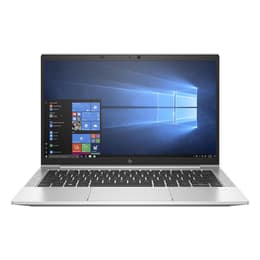
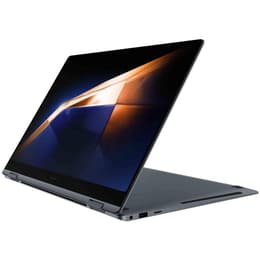
HP EliteBook 830 G7 13" vs Samsung Galaxy Book4 Pro 16"
- 1-year warranty
- Free standard shipping
- Free 30-day returns
Differences at a glance
The HP EliteBook 830 G7 13" (2020) and the Samsung Galaxy Book4 Pro 16" (2024) represent different eras and philosophies in portable computing, catering to distinct workspace demands. While the HP model focuses on a compact, highly portable form factor built for enterprise mobility, the Samsung device prioritizes a sweeping workspace and modern media capabilities. They operate on the Windows platform, though they differ significantly in screen estate, physical dimensions, and hardware generation.
Choosing between these two laptops depends heavily on whether daily work requires maximum portability or an expansive display area for multitasking and visual projects.
Available Models
Storage (GB)
Processor
Memory (GB)
Scores
Durability
When examining longevity and durability, both machines offer robust build architectures, though they stem from different release years which influences their total software support timeline.
- Release timeline and software support: The newer Samsung model benefits from a more extended future software support horizon, while the HP EliteBook already has several years of active deployment behind it, though both handle standard enterprise operating system updates reliably.
- Repairability and physical resilience: The HP EliteBook features a modular, enterprise-focused aluminum chassis designed for straightforward component replacement and long-term office maintenance. The Samsung Galaxy Book4 Pro utilizes a slim, integrated profile that emphasizes modern structural rigidity over component modularity.
- Expected practical lifespan: Users can expect dependable daily service from both options, with the HP model serving as a reliable workhorse for traditional office tasks and the Samsung unit positioned for longer-term relevance due to its advanced internal architecture.
Release Year
2020
2024
OS
Windows 11
Windows 11
Performance
Performance capabilities vary noticeably due to the generational gap and hardware design choices implemented in each laptop chassis.
- Multitasking and everyday execution: The Samsung device handles demanding applications, heavy browser tab loads, and complex creative software smoothly with its current-generation processor and high-bandwidth memory configuration. The HP EliteBook manages everyday productivity tasks like document editing, email, and video conferencing efficiently, though it is better suited for lighter workloads.
- Battery behavior and storage: The larger Samsung chassis accommodates a high-capacity battery that easily sustains a full day of mixed mobile use, alongside ample high-speed solid-state storage options. The HP model features a smaller battery footprint reflecting its compact 13-inch design, meaning frequent travelers may need to recharge during extended periods away from an outlet.
- System responsiveness: Users switching between multiple heavy windows will notice a more seamless experience on the Samsung, while the HP offers steady, predictable performance for standard business applications. Choosing a quality-assured refurbished option for the HP EliteBook provides an eco-friendly alternative for budget-conscious professionals needing reliable core computing.
Graphic card
Integrated Graphics
Integrated Graphics
Screen quality
The visual experience serves as one of the most prominent differences when comparing these two specific laptop models due to contrasting display technologies and sizes.
- Display technology and clarity: The Samsung Galaxy Book4 Pro features a large AMOLED display delivering deep blacks, high contrast, and vivid color accuracy suited for media creation and cinematic viewing. The HP EliteBook utilizes a standard IPS panel focused on clear text rendering, anti-glare properties, and comfortable reading for prolonged office hours.
- Brightness and outdoor usability: The Samsung screen offers high peak luminance levels that maintain visibility under bright office lights or outdoor environments. The HP display handles indoor lighting conditions well but requires shaded spots during direct sunlight use.
- Physical screen dimensions: The 16-inch Samsung canvas provides ample space for side-by-side window multitasking, whereas the 13-inch HP screen emphasizes a compact footprint that easily fits into small bags and tight workspace setups.
Resolution
1920 x 1080
2880 x 1800
Screen type
LCD
OLED
Audiovisual
Multimedia components, audio output, and input peripherals shape the day-to-day communication and entertainment experience on both laptops.
- Webcam and communication: The Samsung model integrates an upgraded high-definition camera paired with studio-quality microphones equipped with noise-reduction features for clear virtual meetings. The HP EliteBook includes a standard high-definition webcam and functional microphone array adequate for routine video calls.
- Audio output and speakers: The Samsung device incorporates a quad-speaker system delivering rich audio depth suitable for casual media streaming and presentations. The HP model features downward-facing stereo speakers that provide clear vocal output for speech and conference audio.
- Keyboard and trackpad ergonomics: The Samsung offers a spacious keyboard layout with a wide trackpad, while the HP provides a tactile, click-responsive keyboard praised for comfortable typing during long writing sessions.
Miscellaneous
Practical physical features, port selections, and connectivity standards dictate how easily each device integrates into existing peripheral setups.
- Port selection and connectivity: The Samsung Galaxy Book4 Pro relies heavily on modern universal USB-C ports, an HDMI output, and a traditional USB port alongside fast wireless standards. The HP EliteBook 830 G7 offers a balanced mix of legacy and modern connections, including traditional USB ports, USB-C with docking capabilities, and an optional smart card reader for enterprise security.
- Weight and physical handling: Despite its larger 16-inch screen, the Samsung maintains a surprisingly slim profile, though it commands more desk space than its competitor. The HP EliteBook is significantly lighter and smaller, making it an ideal travel companion for users who prioritize minimal backpack weight.
- Security and authentication: Both machines incorporate biometric login options, including fingerprint readers and facial recognition capabilities, ensuring secure and rapid access to user profiles.
Weight
5 oz
43 oz
Screen size
13
16
What the community thinks
User feedback and community discussions highlight distinct advantages for both computing devices depending on specific daily workflows. Owners of the HP EliteBook 830 G7 frequently praise its sturdy physical construction, comfortable keyboard, and highly portable 13-inch footprint that simplifies travel. Common criticisms center around its older hardware generation and shorter battery longevity under heavy workloads. Conversely, users of the Samsung Galaxy Book4 Pro frequently commend its gorgeous high-resolution display, expansive 16-inch workspace, and reliable all-day battery performance, though some note that its larger size makes it less convenient for cramped commuting environments.
Users prioritizing maximum portability, a compact bag footprint, and traditional office productivity will find the HP EliteBook well-suited to their needs. Meanwhile, users prioritizing a vibrant media display, extensive screen space for multitasking, and modern processing power may lean toward the Samsung Galaxy Book4 Pro. Exploring a sustainable choice through certified refurbishment allows buyers to acquire reliable tech like the EliteBook while reducing electronic waste. Ultimately, the right choice depends on balancing screen real estate against physical mobility requirements.