Compare models
HP EliteBook 840 G11 14" vs Microsoft Surface Laptop 5 15"
- 1-year warranty
- Free standard shipping
- Free 30-day returns
Differences at a glance
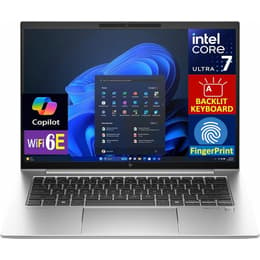
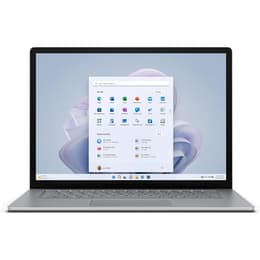
The HP EliteBook 840 G11 14" (2024) and the Microsoft Surface Laptop 5 15" (2022) are robust Windows-powered portable computers designed for different workplace priorities. While the HP EliteBook focuses on modular enterprise versatility and a modern mobile workstation approach, the Microsoft Surface Laptop leans toward a streamlined, expansive screen layout with a touch-enabled interface. Both models operate on the Windows ecosystem, offering a familiar software environment tailored for daily productivity.
Available Models
Storage (GB)
Processor
Memory (GB)
Scores
Durability
When examining hardware longevity and upkeep, these two notebooks adopt contrasting engineering philosophies regarding serviceability and release timing.
- Release Timeline and Software Support: The HP EliteBook 840 G11 launched more recently in 2024, whereas the Microsoft Surface Laptop 5 debuted in late 2022. Both devices receive standard Windows updates, but the newer release date of the HP model extends its active support window.
- Repairability and Upgrades: The HP EliteBook features modular components including user-accessible memory slots that allow capacity expansion over time. The Microsoft Surface Laptop 5 utilizes soldered memory that cannot be upgraded post-purchase, though it does feature a removable solid-state drive.
- Expected Practical Lifespan: Both chassis structures utilize durable metal builds designed to withstand daily transit, though replaceable internal components give the HP model an advantage for long-term hardware maintenance.
Release Year
2023
2022
OS
Windows 11
Windows 11
Performance
Handling everyday office applications, multi-window browsing, and administrative tasks relies on distinct hardware configurations inside each chassis.
- Processor Capabilities and Responsiveness: Both laptops handle demanding multitasking, document editing, and browser-heavy workflows smoothly, with the HP model incorporating current-generation processing architecture featuring dedicated efficiency cores for background tasks.
- Memory and Storage Configurations: Storage relies on fast solid-state drives across both devices for rapid file transfers and boot sequences. Memory capacities range widely from standard configurations up to high-tier allotments, though the HP model supports user-swaps for memory modules.
- Battery Behavior: Each laptop provides sufficient charge capacity to navigate a typical workday of remote meetings and writing tasks, shifting under intensive multi-application loads that trigger faster energy consumption.
Graphic card
Integrated Graphics
Integrated Graphics
Screen quality
Display characteristics differ significantly in physical dimensions, aspect ratio formatting, and interactive capabilities.
- Display Technology and Resolution: The HP EliteBook features a traditional 14-inch widescreen panel with clear anti-glare coatings, while the Microsoft Surface Laptop provides a larger 15-inch touch-sensitive screen utilizing a taller format.
- Aspect Ratio and Viewing Area: The taller aspect ratio on the Microsoft device optimizes vertical document viewing and web reading, whereas the HP widescreen layout aligns cleanly with standard video playback and side-by-side windows.
- Brightness and Clarity: Both screens deliver sharp text rendering and consistent indoor visibility, though outdoor usage under direct sunlight requires maximum brightness settings on both units.
Resolution
1920 x 1200
2496 x 1664
Screen type
IPS
IPS
Audiovisual
Virtual collaboration tools, integrated optics, and media output hardware shape the daily multimedia experience.
- Webcam and Video Calls: The HP EliteBook incorporates a high-resolution camera paired with integrated privacy controls, whereas the Microsoft Surface Laptop utilizes a standard high-definition sensor alongside facial recognition hardware.
- Microphone and Voice Clarity: Dual microphone arrays built into both frames isolate ambient office background noise effectively during virtual meetings and audio recording sessions.
- Speaker Output: Built-in stereo speakers produce clear dialogue and adequate volume for casual media streaming, though external headphones remain preferable for extended listening sessions.
Miscellaneous
Physical connectivity ports, security sensors, and portability factors influence how each laptop integrates into mobile work routines.
- Port Selection: The HP EliteBook offers a versatile array of connections including traditional USB ports, HDMI, and rapid Thunderbolt channels. The Microsoft Surface Laptop utilizes a streamlined port layout consisting of a single USB-C port, a USB-A connection, and a magnetic charging interface.
- Security and Biometrics: Both machines feature biometric login protocols through integrated infrared cameras for facial recognition, while select enterprise configurations of the HP model also support smart card reading.
- Dimensions and Weight: The HP model balances a compact 14-inch footprint with a lightweight profile, while the Microsoft alternative offers a larger 15-inch workspace with a minimal penalty in overall carrying weight.
Weight
80 oz
64 oz
Screen size
14
15
What the community thinks
User feedback highlights distinct preferences for each machine across professional communities. Owners of the HP EliteBook 840 G11 frequently praise its extensive physical port selection, robust build quality, and internal upgrade paths. Conversely, users often favor the Microsoft Surface Laptop 5 for its clean aesthetic design, comfortable keyboard layout, and expansive touch-sensitive display. A quality-assured refurbished option provides an eco-friendly alternative for acquiring either device while supporting sustainable technology consumption.
Users prioritizing a traditional widescreen layout, flexible hardware expandability, and diverse legacy connections will find the HP EliteBook 840 G11 well-suited to their needs. Meanwhile, users prioritizing a larger interactive touch screen, a taller document-viewing format, and a minimalist port structure may lean toward the Microsoft Surface Laptop 5. Evaluating these core ergonomic and structural differences ensures a choice aligned with individual daily workflows.