Microsoft Surface Laptop 3 13" vs Microsoft Surface Laptop 4 13"

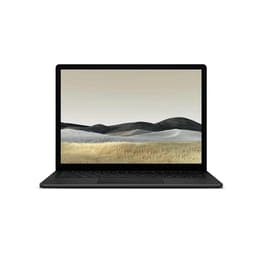
Microsoft Surface Laptop 3 13"
Starting at

Refurbished price:$266.00

Versus $1,209.00 new

See options
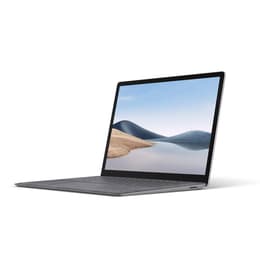
Microsoft Surface Laptop 4 13"
Starting at

Refurbished price:$353.04

Versus $1,459.99 new

See options

The Microsoft Surface Laptop 3 13-inch, released in October 2019, and the Microsoft Surface Laptop 4 13-inch, launched in April 2021, are both portable laptops designed for productivity and everyday use. While they share a consistent design aesthetic and operate on the Windows platform, the Surface Laptop 4 introduces enhancements in internal performance and battery longevity.

Both devices offer a familiar user experience within the Windows ecosystem, but the newer model brings updated components that influence daily operation.

Scores

Durability

When considering the long-term usability of these laptops, their release timelines and design for serviceability play a role in their practical lifespan.

  • Release Timeline: The Surface Laptop 3 was released in October 2019, while the Surface Laptop 4 followed in April 2021. This two-year difference means the Surface Laptop 4 will generally receive software updates and security patches for a longer period, extending its software longevity.
  • OS Support: Both models run Windows and are eligible for upgrades to newer Windows versions, ensuring access to the latest features and security for several years. The Surface Laptop 4, being newer, naturally benefits from an extended support window.
  • Repairability: Both the Surface Laptop 3 and Surface Laptop 4 feature Solid State Drives (SSDs) that are designed to be removable and replaceable, though this process is intended for authorized service technicians rather than end-users. The RAM in both models is soldered, meaning it cannot be upgraded after purchase. The Surface Laptop 3 received an iFixit repairability score of 5 out of 10, a notable improvement over its predecessors. The Surface Laptop 4 is described as moderately repairable, with the ability to be opened without breaking the screen, though battery replacement remains challenging due to adhesive.

Release Year

2019

2020

OS

Windows 11

Windows 11

Performance

The performance of a laptop significantly impacts daily tasks, from simple browsing to more demanding applications. The Surface Laptop 4 offers a noticeable boost in processing power compared to its predecessor.

  • Processor Capabilities: The Surface Laptop 3 is equipped with 10th-generation Intel Core processors, providing solid performance for general computing tasks and multitasking. The Surface Laptop 4, however, features newer 11th-generation Intel Core processors or custom AMD Ryzen 4000 series processors, offering a noticeable boost in processing power. This translates to smoother operation for demanding applications and more efficient handling of complex workloads.
  • Battery Behavior: The Surface Laptop 4 generally offers improved battery life compared to its predecessor. While the Surface Laptop 3 provided around 7.5 to 9.5 hours of real-world usage, the Surface Laptop 4 can achieve significantly longer runtimes, with some configurations claiming up to 19 hours. This extended duration means less frequent charging for heavy users.
  • Storage and Responsiveness: Both models utilize fast Solid State Drives (SSDs) for storage, contributing to quick boot times and rapid application loading. The availability of various storage options allows users to choose based on their needs for file storage and application installation.

Memory (GB)

8 GB

16 GB

Processor

Core i5 - Gen 10 (G7)

Core i7-1185G7

Graphic card

Integrated Graphics

Integrated Graphics

Screen quality

Both Surface Laptops offer a high-quality visual experience, suitable for both work and media consumption, with identical display specifications.

  • Display Technology and Resolution: Both the Surface Laptop 3 and Surface Laptop 4 feature a 13.5-inch PixelSense touchscreen display with a resolution of 2256 x 1504 pixels. This results in a pixel density of 201 pixels per inch, providing sharp text and clear images for productivity tasks like document editing and web browsing.
  • Aspect Ratio and Viewing Experience: The 3:2 aspect ratio offers more vertical screen real estate than traditional 16:9 displays, which can be beneficial for productivity by showing more content without excessive scrolling. The touch functionality and support for the Surface Pen on both models enhance interactive use.
  • Brightness and Clarity: The displays are known for being bright and vivid, providing a good viewing experience in various lighting conditions. Users generally praise the vibrant nature of these PixelSense displays.

Resolution

2256 x 1504

2256 x 1504

Screen type

LED

LCD

Audiovisual

The audio and visual components are important for communication and media consumption on these devices, with largely consistent features across both generations, though the Surface Laptop 4 introduces an audio enhancement.

  • Camera System: Both the Surface Laptop 3 and Surface Laptop 4 are equipped with a 720p HD front-facing camera. This camera is suitable for video calls and online meetings, providing clear visuals in well-lit conditions. Both also integrate Windows Hello face authentication for secure and convenient login.
  • Microphone Quality: Both laptops include dual far-field Studio Mics, designed to capture clear audio and reduce background noise during calls or voice commands.
  • Speaker Output: The Surface Laptop 3 features Omnisonic Speakers with Dolby Audio. The Surface Laptop 4 enhances this with Omnisonic Speakers featuring Dolby Atmos, which can provide a more immersive audio experience for media consumption. User feedback for the Surface Laptop 3 often praises its loud and clear speakers with good bass.

Miscellaneous

Beyond core performance, several practical elements contribute to the overall user experience of these laptops, with many aspects remaining consistent between the two models.

  • Connectivity Options: Both the Surface Laptop 3 and Surface Laptop 4 support Wi-Fi 6 (802.11ax) for fast wireless internet connections and Bluetooth 5.0 for connecting peripherals.
  • Port Types: The port selection is identical across both generations, featuring one USB-C port (USB 3.2 Gen 2 with Power Delivery), one USB-A port (USB 3.2 Gen 2), a 3.5mm headphone jack, and a Surface Connect port for charging and docking accessories.
  • Weight and Dimensions: The physical design of the 13-inch models remained largely consistent between generations. Both the Surface Laptop 3 and Surface Laptop 4 measure approximately 308 x 223 x 14.5 mm (12.1 x 8.8 x 0.57 inches) and weigh around 1.27 to 1.29 kg (2.79 to 2.84 lbs), making them highly portable.

Weight

96 oz

1760 oz

Screen size

13

13

User feedback for both the Surface Laptop 3 and Surface Laptop 4 generally praises their premium design, comfortable keyboards, and vibrant PixelSense displays. Common criticisms for both models often point to the relatively thick display bezels compared to some competitors and a somewhat limited port selection. The Surface Laptop 4, in particular, received positive remarks for its improved performance and extended battery life over its predecessor.

Users prioritizing a balance of portability, a comfortable typing experience, and a high-resolution touchscreen for everyday productivity and light creative tasks will find either device well-suited to their needs. Those who require more robust performance for demanding applications, longer battery life, or the option of an AMD processor may lean toward the Surface Laptop 4. Conversely, users with less intensive workloads who appreciate a solid, reliable laptop might find the Surface Laptop 3 to be a suitable option. Both models offer a refined Windows experience without unnecessary pre-installed software.

For those considering a more sustainable choice, both the Surface Laptop 3 and Surface Laptop 4 are available as quality-assured refurbished options, providing an eco-friendly alternative to purchasing new devices.
See all articles

Our recent comparisons