Compare models

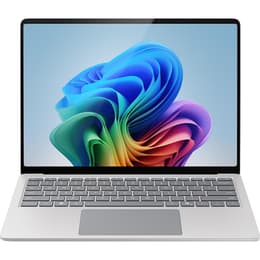
Microsoft Surface Laptop 4 13" vs Microsoft Surface Pro 9 13"

  • 1-year warranty
  • Free standard shipping
  • Free 30-day returns
Microsoft Surface Laptop 4 13"
Starting at

Refurbished price:$415.00

Versus $1,049.00 new

See options
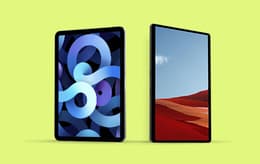
Microsoft Surface Pro 9 13"
Starting at

Refurbished price:$816.00

Versus $899.99 new

See options

Differences at a glance

The Microsoft Surface Laptop 4 13" (2021) and the Microsoft Surface Pro 9 13" (2022) represent two distinct approaches to portable computing within the Windows ecosystem. While both devices feature similar screen dimensions and cater to mobile productivity, the Surface Laptop 4 adopts a traditional clamshell notebook design with an attached keyboard, whereas the Surface Pro 9 utilizes a detachable tablet form factor with a removable keyboard cover. Both models run on the Windows operating system, offering a familiar software environment, yet their structural differences fundamentally shape how users interact with them daily.

Available Models

Storage (GB)

Processor

Memory (GB)

Scores

Durability

When evaluating structural longevity and software support, both devices share similarities while reflecting their respective release years and design builds.

  • Software lifecycle and updates: Both computers receive regular operating system updates and security patches from Microsoft, though the slightly newer release year of the second device provides an extended window of official support.
  • Build construction and design durability: The traditional laptop relies on a fixed, rigid aluminum hinge and chassis, while the tablet format features a built-in kickstand and relies on a magnetic keyboard attachment, each offering distinct mechanical wear patterns over years of daily transport.
  • Expected functional lifespan: Choosing a quality-assured refurbished option provides access to these durable productivity machines through a sustainable choice that extends device longevity without compromising operational integrity.

Release Year

2020

2022

OS

Windows 11

Windows 11

Performance

Performance capabilities vary based on internal hardware generations, thermal design, and multitasking demands during intensive daily usage.

  • Storage and memory configurations: Both models offer multiple solid-state drive capacities and random-access memory tiers, allowing users to select specifications that comfortably handle heavy document editing, numerous browser tabs, and background applications simultaneously.
  • Everyday responsiveness and processing: Applications launch swiftly and system navigation remains fluid across both devices, though the newer processor architecture in the tablet configuration handles demanding computational tasks and sustained workloads with improved thermal efficiency.
  • Battery behavior during portable use: The traditional laptop chassis accommodates a battery capacity that typically sustains a full standard workday of mixed web browsing and document creation, while the compact tablet form factor may require more frequent recharges during heavy performance tasks.

Graphic card

Integrated Graphics

Integrated Graphics

Screen quality

Display characteristics define the visual workspace, impacting everything from casual media streaming to detailed graphic design tasks.

  • Panel technology and resolution: Both devices utilize high-resolution pixel-dense touchscreens with custom aspect ratios designed to display more vertical content, making them well-suited for reading documents and viewing spreadsheets.
  • Brightness and outdoor visibility: Maximum luminance levels on both screens allow for comfortable indoor use under bright office lights, while outdoor readability remains manageable in shaded environments despite potential glare on the glossy glass surfaces.
  • Motion clarity and refresh rates: The traditional laptop features a standard refresh rate suitable for everyday scrolling, whereas the tablet configuration introduces a higher refresh rate option that results in smoother pen interactions and fluid visual animations.

Resolution

2256 x 1504

1920 x 1200

Screen type

IPS

LED

Audiovisual

Multimedia integration, audio output, and optical hardware cater to remote collaboration and personal entertainment needs.

  • Webcam and video calling hardware: Both models feature front-facing high-definition cameras equipped with facial recognition sensors for secure login, ensuring clear video quality during virtual meetings and remote lectures.
  • Microphone and speaker clarity: Integrated studio microphones isolate voices effectively during calls, while the built-in stereo speakers deliver balanced audio output for listening to music and watching videos without external accessories.
  • Rear camera integration: The tablet configuration includes a rear-facing camera suitable for capturing quick reference photos of documents, a feature omitted in the traditional clamshell notebook design.

Miscellaneous

Physical connectivity, port selection, and handling ergonomics dictate how easily each device integrates into mobile workspaces.

  • Physical port selection: The traditional laptop provides a traditional mix of standard connection ports including universal serial bus options, whereas the tablet configuration streamlines its profile by relying primarily on modern high-speed connection ports for both data transfer and charging.
  • Mobility and physical dimensions: The clamshell notebook offers a balanced weight distribution that rests comfortably on a lap, while the detachable tablet design presents a lighter handheld slate profile that requires the keyboard cover attached for stable typing on uneven surfaces.
  • Input versatility: The notebook provides a fixed keyboard and trackpad experience, whereas the tablet configuration supports active digital styluses directly on the screen alongside a detachable keyboard accessory for versatile note-taking and sketching.

Weight

64 oz

1 oz

Screen size

13

13

What the community thinks

User feedback highlights distinct preferences for each device depending on daily workflow habits. Owners of the Microsoft Surface Laptop 4 frequently praise its comfortable typing angle, sturdy traditional build, and reliable battery life that easily handles office productivity tasks. Conversely, users of the Microsoft Surface Pro 9 often highlight its exceptional versatility, lightweight slate form factor, and responsive touch screen as major advantages for digital artists and frequent travelers who value flexibility above all else. Common criticisms for the laptop focus on its fixed form factor, while tablet users occasionally note that typing on the detachable keyboard while commuting can feel less rigid than a standard laptop base.

Users prioritizing a traditional lap-friendly typing experience and straightforward notebook design will find the Surface Laptop 4 well-suited to their needs. Meanwhile, users prioritizing maximum portability, digital pen input, and a convertible workspace that transitions seamlessly from tablet to laptop will lean toward the Surface Pro 9. Selecting either device allows for an informed decision tailored to specific mobility requirements, ensuring a practical fit for students, professionals, and travelers alike.


Our recent comparisons