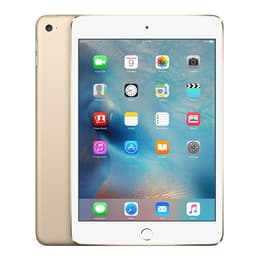
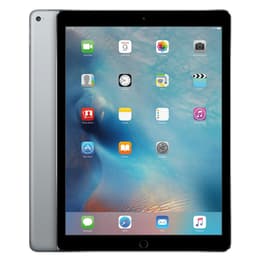
iPad mini 3 (2015, A8 series) vs iPad Pro (2015, A9 series)

iPad mini 3 (2015, A8 series)
Starting at

Refurbished price:$77.00

Versus $399.00 new

See options
iPad Pro (2015, A9 series)
Starting at

Refurbished price:$181.00

Versus $899.00 new

See options

Ratings

The iPad Mini 4 and the original 12.9-inch iPad Pro, both released in 2015, represent distinct approaches to Apple's tablet lineup. The iPad Mini 4, launched in September 2015, offered a compact and portable experience, while the 12.9-inch iPad Pro, introduced in November 2015, aimed at professional users with its larger display and enhanced capabilities. Both devices operate on Apple's iPadOS, but they cater to different user needs through their size, processing power, and feature sets.

Scores

Durability

When considering the longevity of these 2015 tablets, their release timeline and subsequent software support are key factors. Both devices have reached a point where they no longer receive the latest major iPadOS updates, impacting their practical lifespan for modern applications.

  • Software Support: The iPad Mini 4 shipped with iOS 9 and its final major operating system update was iPadOS 15.8.7, released in March 2026. The 12.9-inch iPad Pro (1st Gen) also launched with iOS 9 and received updates up to iPadOS 16.7.x, with the last security update in February 2026. This means the iPad Pro received slightly longer support for major iPadOS versions.
  • Update Status: As of 2026, both models are considered outdated by Apple for full iPadOS feature updates, though they may still receive critical security patches for a limited period. This can affect compatibility with newer apps and services.
  • Physical Durability: Both tablets feature an aluminum unibody design, offering a similar level of build quality for their era. Expected practical lifespan for general use, such as media consumption or light browsing, can extend beyond their official software support, especially if considering a quality-assured refurbished option.

Release Year

2015

2015

Last OS Compatibility

No

No

OS

iPadOS

iPadOS

Maximum Operating System supported

iPadOS 15

iPadOS 16

Performance

The performance capabilities of these two tablets are differentiated by their internal components, influencing how smoothly they handle various tasks.

  • Processing Power: The iPad Mini 4 is equipped with an A8 chip and an M8 motion coprocessor. The 12.9-inch iPad Pro (1st Gen) features the more powerful A9X chip with an M9 motion coprocessor. The A9X chip offers a notable increase in processing and graphics performance compared to the A8, making the iPad Pro better suited for more demanding applications.
  • Multitasking and Responsiveness: The iPad Mini 4 includes 2 GB of RAM, while the 12.9-inch iPad Pro (1st Gen) comes with 4 GB of RAM. This difference in RAM allows the iPad Pro to manage more applications simultaneously and handle complex tasks with greater fluidity, providing a more responsive experience for professional-grade apps or intensive multitasking.
  • Battery Behavior: Both devices were designed to offer up to 10 hours of web surfing on Wi-Fi. However, the larger battery capacity of the iPad Pro (10,307 mAh) compared to the iPad Mini 4 (5124 mAh) means that while both aim for similar usage times, the Pro's larger display and more powerful processor draw more power, balancing out the larger battery.

Memory (GB)

2 GB

4 GB

Processor

Apple A8

Apple A9X

Screen quality

The display experience on these two iPads varies significantly due to their size and specific display characteristics, catering to different viewing preferences and use cases.

  • Display Technology and Resolution: Both tablets feature LED-backlit IPS LCD Retina displays that are fully laminated and have an anti-reflective coating. The iPad Mini 4 has a 7.9-inch display with a 2048x1536 resolution, resulting in a pixel density of 326 pixels per inch (ppi). The 12.9-inch iPad Pro (1st Gen) offers a larger 12.9-inch display with a 2732x2048 resolution, providing a pixel density of 264 ppi. While the Mini 4 has a higher pixel density, the Pro's larger screen offers a more expansive canvas.
  • Brightness and Clarity: The iPad Mini 4 typically achieves brightness levels around 411-443 nits. The 12.9-inch iPad Pro (1st Gen) can reach up to 600 nits of brightness. This higher brightness on the Pro can be beneficial for outdoor use or in brightly lit environments, enhancing visibility and overall clarity.
  • Refresh Rate and Viewing Experience: Both models feature a standard 60Hz refresh rate. Neither device includes the ProMotion technology for adaptive refresh rates, which was introduced in later iPad Pro models. The larger screen of the iPad Pro provides a more immersive viewing experience for media consumption and a more spacious workspace for productivity tasks, while the Mini 4 offers a more portable and hand-friendly display.

Resolution

2048 x 1536

2048 x 2732

True Tone

No

No

Pro-Motion

No

No

Screen type

Retina display

Retina display

Pixel density

326ppp

264ppp

Brightness

400 nits brightness

400 nits brightness

Sound quality

Speakers

Stereo speakers

Four speaker audio

Audiovisual

While tablets are not typically primary photography devices, both the iPad Mini 4 and the 12.9-inch iPad Pro (1st Gen) include camera systems suitable for casual photography, video calls, and document scanning.

  • Rear Camera Performance: Both tablets are equipped with an 8-megapixel rear camera with an f/2.4 aperture. They are capable of recording 1080p HD video at 30 frames per second. The 12.9-inch iPad Pro (1st Gen) also supports slo-mo video at 720p at 120 frames per second. In everyday lighting conditions, both cameras can capture clear images and videos, though they may struggle in very low-light environments.
  • Front Camera Capabilities: For video calls and selfies, both devices feature a 1.2-megapixel FaceTime HD front camera with an f/2.2 aperture, capable of recording 720p HD video. This is sufficient for standard video conferencing and quick self-portraits.
  • Audio Experience: The iPad Mini 4 features dual stereo speakers, typically located on the bottom edge. The 12.9-inch iPad Pro (1st Gen) distinguishes itself with a four-speaker audio system, providing a richer and more immersive sound experience, especially when watching movies or playing games. Both include dual microphones for calls and audio recording.

Miscellaneous

Beyond core performance and display, several practical elements contribute to the overall user experience and differentiate these two iPad models.

  • Connectivity and Ports: Both tablets support Wi-Fi 802.11a/b/g/n/ac with dual-band capabilities and MIMO technology, along with Bluetooth 4.2. Cellular models were available for both, offering mobile data connectivity. Both utilize the Lightning connector for charging and data transfer, and include a 3.5mm headphone jack. The 12.9-inch iPad Pro (1st Gen) also features a Smart Connector, allowing for direct connection to accessories like keyboards.
  • Sensors and Biometrics: Both devices incorporate Touch ID for secure authentication and Apple Pay functionality. They also include a three-axis gyroscope, accelerometer, barometer, and ambient light sensor for various functionalities and automatic adjustments.
  • Physical Characteristics and Accessories: The iPad Mini 4 is significantly more compact and lighter, measuring 203.2 x 134.8 x 6.1 mm and weighing approximately 298.8 grams for the Wi-Fi model. This makes it highly portable and easy to handle with one hand. The 12.9-inch iPad Pro (1st Gen) is a much larger device at 305.7 x 220.6 x 6.9 mm and weighs around 713 grams for the Wi-Fi model, making it better suited for desk-based use or two-handed operation. A key differentiator is the 12.9-inch iPad Pro's support for the 1st generation Apple Pencil, enabling precise input for drawing and note-taking, a feature not available on the iPad Mini 4.

Weight

10 oz

25 oz

Width

5.2 in

8.6 in

Height

8 in

12 in

Depth

0.2 in

0.2 in

Screen size (inches)

7.9

12.9

Network

Wi-Fi

Wi-Fi

Carrier compatibility

Without SIM Port

Without SIM Port

Wi-Fi technology

Wi-Fi 6 802.11a/b/g/n/ac

Wi-Fi 6 802.11a/b/g/n/ac

Bluetooth Version

Bluetooth 4.2

Bluetooth 4.2

Face ID

No

No

Touch ID

Yes

Yes

Connector

Lightning connector

Lightning connector

User sentiment for both the iPad Mini 4 and the 12.9-inch iPad Pro (1st Gen) often highlights their respective strengths and limitations, particularly given their age. Users frequently praise the iPad Mini 4 for its highly portable form factor, making it convenient for reading, casual browsing, and light entertainment on the go. Criticisms often revolve around its smaller screen size for productivity tasks and its older processor, which can lead to slower performance with more demanding applications or newer iPadOS features.

The 12.9-inch iPad Pro (1st Gen) is generally lauded for its expansive display, which provides an excellent canvas for media consumption, digital art with the Apple Pencil, and multitasking. Its more powerful processor and additional RAM were significant advantages at its release, allowing for smoother operation with professional applications. However, its larger size and weight are sometimes noted as drawbacks for portability, and like the Mini 4, its older hardware means it no longer supports the latest iPadOS versions, which can limit access to new features and app compatibility.

Users prioritizing a highly portable tablet for casual use, reading, and basic tasks may find the iPad Mini 4 well-suited to their needs. Its compact design makes it easy to carry and use in various settings. Conversely, users who require a larger screen for creative work, extensive multitasking, or a more immersive media experience, and who value Apple Pencil support, may lean toward the 12.9-inch iPad Pro (1st Gen). Both devices, while no longer receiving the newest software updates, can still serve specific purposes effectively. For those seeking a sustainable choice, exploring quality-assured refurbished options for either model can provide a practical solution for these distinct user profiles.

See all articles

Our recent comparisons