Compare models
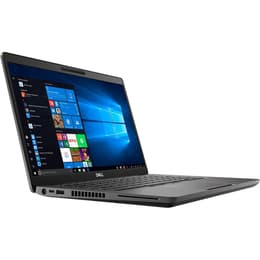
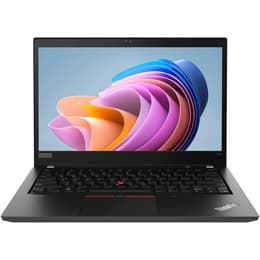
Dell Latitude 5400 14" vs Lenovo ThinkPad T14 G1 14"
- 1-year warranty
- Free standard shipping
- Free 30-day returns
Differences at a glance
The Dell Latitude 5400 14" (2019) and the Lenovo ThinkPad T14 Gen 1 14" (2020) represent mainstream enterprise-grade laptops designed for professional environments, students, and remote workers. While they share similar screen sizes and business-focused feature sets, they originate from different generations and manufacturer ecosystems, introducing subtle variations in hardware options and internal design. Both machines typically run on standard desktop operating systems like Windows, offering familiar enterprise environments. The primary differences lie in their generation release timeline, port configurations, and processor options, which influence overall daily responsiveness and device capability.
Available Models
Storage (GB)
Processor
Memory (GB)
Scores
Durability
When examining hardware longevity and physical resilience, both business-class notebooks offer robust designs built to handle frequent travel and daily workplace demands with ease.
- Release timeline and age: The Dell Latitude 5400 launched slightly earlier than the Lenovo ThinkPad T14 Gen 1, meaning availability of component replacement parts may differ slightly over time, though both maintain strong repairability profiles.
- Software support: Operating system longevity depends heavily on the chosen software installation, but standard business drivers and firmware updates remain accessible for both manufacturers to ensure reliable ongoing operation.
- Expected practical lifespan: Both devices are engineered with durable chassis materials designed for multi-year deployment, making them reliable quality-assured refurbished options for users seeking long-term productivity tools.
Release Year
2019
2020
OS
Windows 11
Windows 11
Performance
Performance capabilities vary based on internal configurations, yet both laptops handle everyday office workloads, web browsing, and document editing smoothly.
- Storage and multitasking: Both models support configurable solid-state storage and sufficient memory capacities to run multiple background applications, browser tabs, and productivity suites concurrently without noticeable stuttering.
- Processor behavior: Current-generation processing hardware in both units handles demanding applications, spreadsheet calculations, and video conferencing efficiently while managing thermal output during extended work sessions.
- Battery behavior: Battery endurance varies depending on charge cycle history and workload intensity, but both machines typically sustain standard working hours under moderate use before requiring a recharge.
Graphic card
Integrated Graphics
Integrated Graphics
Screen quality
Display configurations on these 14-inch notebooks prioritize readability and visual clarity for professional tasks and media consumption.
- Display technology: Both models utilize panel technologies that offer wide viewing angles, reducing color shifting when viewed from the side during collaborative work settings.
- Resolution and clarity: Standard high-definition resolutions provide sharp text rendering and clear image reproduction, minimizing eye strain during extended reading or writing tasks.
- Brightness levels: Panel brightness accommodates typical indoor office environments and moderately lit rooms, ensuring text remains legible under standard overhead lighting.
Resolution
1920 x 1080
1920 x 1080
Audiovisual
Multimedia capabilities and audio features on these business laptops focus primarily on clear communication during virtual meetings and calls.
- Camera system: Integrated webcams provide adequate video clarity for remote conferencing, supported by software adjustments for varying indoor lighting conditions.
- Microphone and speaker output: Built-in microphone arrays capture voice input clearly while reducing ambient background chatter, and internal speakers deliver balanced sound output suitable for speech and conference calls.
- Media consumption: While optimized for productivity rather than cinematic entertainment, both laptops provide satisfactory audio-visual playback for casual video streaming.
Miscellaneous
Practical design elements, physical dimensions, and connectivity ports define how easily each laptop integrates into an existing workspace setup.
- Connectivity options: Both devices feature robust wireless network adapters and Bluetooth capabilities for connecting external peripherals, wireless mice, and headsets.
- Port selection: Comprehensive physical port selections include traditional USB inputs, video output ports, and network jacks, reducing the need for external adapters during presentations.
- Dimensions and build: Weighing similarly around the 14-inch standard, both laptops balance screen workspace with portability, fitting comfortably into standard backpacks for daily commuting.
Weight
52 oz
4 oz
Screen size
14
14
What the community thinks
User feedback from online communities highlights distinct community perspectives regarding these two enterprise notebooks. Owners of the Dell Latitude 5400 frequently praise its dependable daily reliability, comfortable keyboard layout, and straightforward maintenance structure. Conversely, users often favor the Lenovo ThinkPad T14 Gen 1 for its iconic typing ergonomics, robust security features, and solid structural integrity. Common discussions note that while both machines handle standard office duties effortlessly, older configurations may require battery evaluations when purchased secondhand.
Users prioritizing a traditional enterprise typing experience and robust security integrations may lean toward the Lenovo ThinkPad T14 Gen 1, while users seeking a dependable, straightforward workstation with broad port availability will find the Dell Latitude 5400 well-suited to their needs. Both models serve as sustainable choices when selected through a quality-assured refurbished option, minimizing electronic waste while delivering reliable daily performance. Final decisions ultimately depend on individual ergonomic preferences and specific port requirements for external hardware.