
Compare models

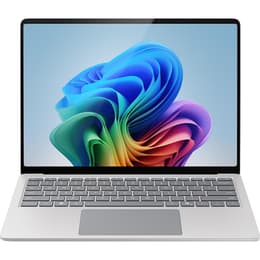
Dell Latitude 5410 14" vs Microsoft Surface Pro 9 13"

  • 1-year warranty
  • Free standard shipping
  • Free 30-day returns
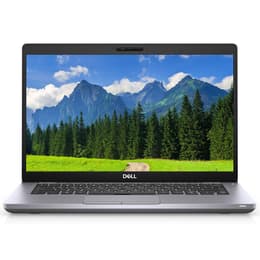
Dell Latitude 5410 14"
Starting at

Refurbished price:$240.00

Versus $689.00 new

See options
Microsoft Surface Pro 9 13"
Starting at

Refurbished price:$816.00

Versus $899.99 new

See options

Differences at a glance

The Dell Latitude 5410 14" (2020) and Microsoft Surface Pro 9 13" (2022) represent two distinct approaches to portable computing, catering to professionals, students, and travelers with different workflow preferences. While the Dell Latitude 5410 is a traditional clamshell business laptop designed for productivity and connectivity, the Microsoft Surface Pro 9 functions as a versatile 2-in-1 device that transitions between a tablet and a laptop. They run on Windows and serve distinct physical form factor needs while delivering dependable daily performance.

Available Models

Storage (GB)

Processor

Memory (GB)

Scores

Durability

When evaluating hardware longevity and software support, both computers handle current enterprise operating systems efficiently, though their physical construction and update lifecycles differ based on their release years.

  • Operating system support and updates: Both machines receive regular security patches and system updates from Microsoft, with the newer release date of the second device granting a slightly extended software lifespan.
  • Repairability and physical durability: The traditional laptop design offers straightforward component access for maintenance, whereas the tablet form factor utilizes a sealed chassis that prioritizes slim dimensions over internal modularity.
  • Expected practical lifespan: Choosing a quality-assured refurbished option provides a sustainable choice that extends the active service life of enterprise-grade hardware, matching the demands of long-term professional use.

Release Year

2020

2022

OS

Windows 11

Windows 11

Performance

Handling daily office tasks, web browsing, and multitasking depends heavily on how each system manages its internal processing power, memory configurations, and thermal output during extended work sessions.

  • Multitasking and everyday responsiveness: Both devices switch smoothly between document editing, browser tabs, and communication applications without noticeable delays during standard professional workflows.
  • Storage and memory options: Configurations vary across different models, providing sufficient capacity for large file archives, local document storage, and seamless background application handling.
  • Thermal management and battery behavior: The traditional laptop chassis accommodates larger cooling fans for sustained workloads, while the tablet format relies on compact power management that balances portability with steady energy consumption during mobile use.

Graphic card

Integrated Graphics

Integrated Graphics

Screen quality

Visual workspace comfort depends on panel dimensions, resolution clarity, and surface brightness, which directly impact readability under varying indoor and outdoor lighting environments.

  • Display technology and resolution: Both options feature crisp, high-definition screens with accurate color reproduction, making text documents sharp and media consumption clear.
  • Brightness and outdoor visibility: Panel illumination levels allow for comfortable viewing in brightly lit offices or near windows, though reflective glass surfaces require careful positioning under direct sunlight.
  • Viewing experience and interaction: The traditional laptop offers a fixed 14-inch workspace ideal for side-by-side window multitasking, while the 13-inch touch-enabled surface supports direct stylus input and flexible viewing angles.

Resolution

1366 x 768

1920 x 1200

Screen type

IPS

LED

Audiovisual

Virtual collaboration tools, audio output, and media playback capabilities shape the daily remote meeting and entertainment experience on both portable computers.

  • Webcam and video calling: Integrated front-facing cameras deliver clear video quality for remote meetings, supported by dual microphones that capture clear speech while minimizing background noise.
  • Speaker output and media consumption: Built-in stereo speakers provide adequate volume and clarity for video conferences and casual video viewing, though external headphones remain preferable for immersive sound.
  • Imaging features: Rear-facing camera additions on the tablet configuration allow for quick document scanning and field photography, a feature less common on traditional clamshell laptops.

Miscellaneous

Physical dimensions, weight distribution, and port availability dictate how easily each device transitions between stationary desk setups and mobile travel environments.

  • Port selection and connectivity: The traditional laptop includes a wide array of built-in physical ports like standard USB, HDMI, and Ethernet without requiring external adapters, whereas the tablet form factor relies on compact universal connection ports and wireless accessories.
  • Weight and physical dimensions: The ultra-thin tablet body minimizes travel weight and bulk inside a backpack, while the standard laptop provides a sturdier base for lap-based typing during commutes.
  • Build materials and security sensors: Both incorporate durable chassis materials alongside secure sign-in features such as facial recognition or fingerprint readers to protect user data.

Weight

6000 oz

1 oz

Screen size

14

13

What the community thinks

User feedback from online communities highlights distinct operational preferences for each machine. Owners of the Dell Latitude 5410 frequently praise its extensive physical port selection, comfortable keyboard layout, and reliable day-to-day durability in office environments. Common discussions note that its heavier traditional chassis is less optimized for hand-held reading. Conversely, users of the Microsoft Surface Pro 9 appreciate its lightweight portability, vibrant touch display, and seamless adaptation between digital note-taking and desktop typing. Frequent considerations involve the separate purchase requirement for the physical keyboard cover and limited legacy port options without a docking accessory.

Users prioritizing a traditional lap-friendly typing experience, robust built-in connectivity, and straightforward peripheral attachment will find the Dell Latitude 5410 well-suited to their routine. Meanwhile, users prioritizing maximum portability, touch-screen interaction, and a flexible tablet format may lean toward the Microsoft Surface Pro 9. Exploring an eco-friendly alternative through a quality-assured refurbished option provides a sustainable choice for acquiring either device while supporting responsible resource use. Ultimately, the decision rests on whether a stationary productivity setup or a versatile mobile form factor aligns best with daily travel and workspace requirements.

Our recent comparisons