Compare models
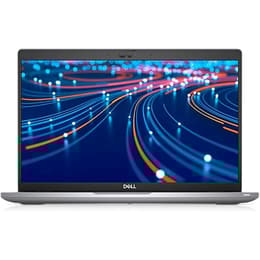
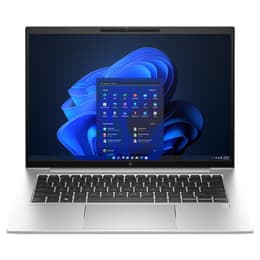
Dell Latitude 5420 14" vs HP EliteBook 840 G10 14"
- 1-year warranty
- Free standard shipping
- Free 30-day returns
Differences at a glance
The Dell Latitude 5420 (2021) and the HP EliteBook 840 G10 (2023) are 14-inch professional laptops designed for business users, students, and remote professionals. While both run on the Windows operating system and offer robust productivity features, they stem from different hardware generations. The primary differentiators lie in their internal processing architectures, physical weight profiles, and release timelines, which influence overall longevity and everyday responsiveness.
Available Models
Storage (GB)
Processor
Memory (GB)
Scores
Durability
Evaluating the long-term viability of these devices involves looking at release dates, update support cycles, and overall physical construction durability.
- Release Timeline and Software Support: The HP EliteBook 840 G10 arrived two years after the Dell Latitude 5420, meaning it benefits from a more extended window of official operating system updates and security patches.
- Repairability and Build Construction: Both laptops feature modular internal components that allow straightforward part replacements, though the newer HP model incorporates modern materials designed to withstand travel wear over extended periods.
- Expected Practical Lifespan: Users can expect reliable multi-year performance from both choices, with the newer HP model retaining peak operating system compatibility further into the future.
Release Year
2021
2023
Last Os Compatibility
Yes
Yes
OS
Windows 11
Windows 11
Performance
System responsiveness and everyday multitasking depend heavily on internal hardware generations, memory configurations, and energy management.
- Multitasking and Processing Speed: The HP EliteBook 840 G10 utilizes a more recent processor generation that handles demanding web applications and heavy office workflows with noticeably quicker load times compared to the slightly older processing architecture inside the Dell Latitude 5420.
- Memory and Storage Configurations: Both laptops support configurable solid-state storage and ample memory modules, ensuring smooth switching between dozens of browser tabs and document editors.
- Battery Behavior: The newer processor inside the HP model yields slightly better energy efficiency during extended mobile work sessions, whereas the Dell model delivers standard all-day battery performance for typical office tasks.
Graphic card
Integrated Graphics
Integrated Graphics
Screen quality
Display performance affects daily reading comfort, video conferencing clarity, and general workspace visibility under varying lighting conditions.
- Panel Technology and Resolution: Both devices feature 14-inch screens with clear high-definition resolution and matte anti-glare coatings that reduce reflections from overhead office lighting.
- Brightness Levels: The HP EliteBook 840 G10 generally offers higher peak panel brightness options, making it easier to read text and view content near sunlit windows or outdoor environments.
- Color Accuracy: Both laptops utilize standard color reproduction panels suitable for professional document creation, spreadsheets, and media consumption rather than color-critical creative work.
Resolution
1920 x 1080
1920 x 1200
Screen type
IPS
IPS
Audiovisual
Audio and visual communication tools are essential considerations for frequent video meetings and media playback.
- Webcam Capabilities: The HP EliteBook 840 G10 includes a higher-resolution camera sensor paired with automated lighting adjustments, while the Dell Latitude 5420 relies on a standard high-definition webcam suitable for routine virtual check-ins.
- Microphone and Speaker Output: Both systems integrate directional microphones that filter out background chatter alongside downward-firing speakers that deliver clear voice audio for virtual calls.
- Media Consumption: Built-in speakers on both laptops provide adequate volume for casual video watching, though external headphones or speakers are recommended for immersive listening.
Miscellaneous
Physical dimensions, port selections, and connectivity standards dictate how easily these laptops integrate into mobile workspaces and desk setups.
- Port Selection: Both models include comprehensive physical connectivity, featuring versatile USB-C ports with charging capabilities, traditional USB ports, HDMI outputs, and headphone jacks.
- Mobility and Dimensions: The HP EliteBook 840 G10 features a slightly thinner and lighter chassis profile that reduces bag weight for frequent commuters.
- Security and Connectivity: Both devices support modern wireless internet standards and Bluetooth protocols, alongside integrated fingerprint readers and infrared cameras for secure facial recognition sign-ins.
Weight
112 oz
49 oz
Screen size
14
14
What the community thinks
User discussions across community forums highlight distinct preferences for each 14-inch professional laptop. Owners of the Dell Latitude 5420 frequently praise its reliable keyboard layout, robust port selection, and consistent day-to-day stability for standard office duties. Common criticisms point to its slightly heavier chassis and older internal architecture compared to recent hardware generations. Conversely, users favor the HP EliteBook 840 G10 for its improved webcam clarity, lighter travel weight, and quicker system response times during heavy multitasking, though some note that cooling fans can spin up audibly under demanding workloads.
Users prioritizing a lighter travel footprint, modern processing capabilities for intensive multitasking, and extended software support timelines may prefer the HP EliteBook 840 G10. Meanwhile, users focusing on a sturdy traditional office layout with dependable port connectivity and steady performance for everyday document editing will find the Dell Latitude 5420 well-suited to their needs. For those seeking a sustainable choice, a quality-assured refurbished option provides a reliable way to acquire either device while minimizing environmental impact. Ultimately, the choice depends on whether a lighter, newer architecture or a proven, sturdy office configuration aligns best with daily computing habits.