Compare models

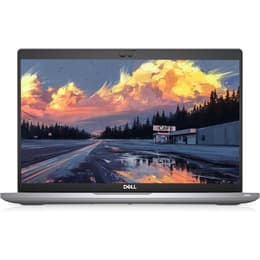
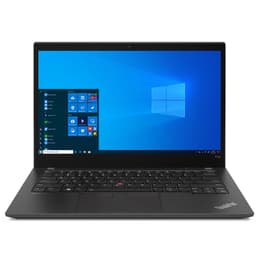
Dell Latitude 5420 14" vs Lenovo ThinkPad T14 G2 14"

  • 1-year warranty
  • Free standard shipping
  • Free 30-day returns
Dell Latitude 5420 14"
Starting at

Refurbished price:$269.99

Versus $399.99 new

See options
Lenovo ThinkPad T14 G2 14"
Starting at

Refurbished price:$399.00

Versus $899.98 new

See options

Differences at a glance

The Dell Latitude 5420 14" (2021) and the Lenovo ThinkPad T14 Gen 2 14" (2021) represent mainstream business laptop lines engineered for professional tasks, academic workloads, and everyday multitasking. While both portables share identical screen dimensions and enterprise-grade security features, they differ noticeably in keyboard feedback, port configurations, and overall chassis design. Operating primarily on Windows, these machines offer familiar software environments for everyday users. Choosing between them usually depends on personal typing preferences, connectivity requirements, and long-term hardware durability priorities.

Available Models

Storage (GB)

Processor

Memory (GB)

Scores

Durability

When examining hardware longevity and support, both enterprise-class laptops are built to withstand frequent daily commuting and extended office use through quality construction standards.

  • Software updates: Both models receive consistent operating system and security updates from Microsoft, complemented by manufacturer-provided driver support and BIOS firmware patches.
  • Repairability: Each machine features accessible internal components that allow IT technicians or users to replace batteries, storage drives, and memory modules without specialized tools.
  • Expected lifespan: Solid chassis builds and professional-tier internal components ensure both laptops maintain reliable performance over many years of continuous daily operation.

Release Year

2021

2020

OS

Windows 11

Windows 11

Performance

Performance capabilities vary slightly depending on configuration options, though both portables easily handle typical productivity suites, web browsing, and heavy multitasking.

  • Multitasking and storage: Both models offer configurable RAM and fast solid-state storage options that ensure quick application launches and smooth switching between numerous open browser windows.
  • Everyday responsiveness: System processing speeds handle demanding office applications, large spreadsheets, and video conferencing seamlessly without noticeable stuttering or lag.
  • Battery behavior: Typical workdays consisting of word processing and web surfing see both machines lasting through standard hours, though intensive processing tasks require more frequent connection to a power outlet.

Graphic card

Integrated Graphics

Integrated Graphics

Screen quality

Display panels on both devices are tailored for extended document editing and media consumption, emphasizing eye comfort and clarity during long working sessions.

  • Panel technology: Both laptops utilize anti-glare display coatings that significantly reduce reflections from overhead office lighting or natural sunlight.
  • Resolution and clarity: Standard configurations provide sharp text rendering and clear image details suitable for professional reports, spreadsheets, and streaming video content.
  • Brightness levels: Adequate maximum brightness ensures visibility remains comfortable in indoor environments and moderately lit shared workspaces or classrooms.

Resolution

1920 x 1080

3840 x 2160

Screen type

LED

LCD

Audiovisual

Multimedia capabilities focus on clear communication and reliable audio output for remote meetings, online learning sessions, and virtual catch-ups.

  • Webcam performance: Integrated cameras capture clear video feeds for virtual meetings, handling indoor lighting conditions well enough for professional communication.
  • Microphone clarity: Dual-array microphones filter out background noise effectively, ensuring speech remains distinct and understandable during voice calls and online conferences.
  • Speaker output: Built-in stereo speakers deliver balanced sound for casual music listening and video playback, though external headphones remain preferable for immersive media consumption.

Miscellaneous

Physical dimensions and connectivity layouts highlight different design philosophies tailored to various mobile working setups and desk configurations.

  • Connectivity options: Both laptops provide robust wireless standards alongside comprehensive physical port selections, minimizing the need for external adapters during presentations.
  • Weight and handling: Travel-friendly weights and slim profiles allow both devices to slide easily into standard backpacks or briefcases for daily transit.
  • Build materials: Durable exterior shells incorporate sustainable materials, with the quality-assured refurbished option presenting an eco-friendly choice for conscious consumers looking to reduce electronic waste.

Weight

64 oz

56 oz

Screen size

14

14

What the community thinks

Users seeking a reliable mobile workstation will find both the Dell Latitude 5420 and the Lenovo ThinkPad T14 Gen 2 capable companions for daily productivity tasks. Feedback from community forums and long-term users frequently praises the Dell model for its comfortable layout and versatile connectivity options, while the Lenovo alternative receives consistent acclaim for its legendary keyboard tactile response and robust enterprise security integration. Frequent travelers and remote workers often highlight how easily both machines handle demanding schedules, though some users note that fan noise can increase slightly during intensive multi-application workloads.

Users prioritizing a tactile typing experience and traditional enterprise design may prefer the Lenovo ThinkPad, while users looking for balanced port variety and straightforward daily reliability often lean toward the Dell Latitude. Neither device requires compromise on essential professional features. Choosing the right model simply depends on individual workflow habits and physical design preferences. Opting for a quality-assured refurbished option provides a sustainable way to acquire either of these capable professional tools while supporting eco-friendly technology consumption.
Our recent comparisons