Compare models

Lenovo ThinkPad T14 G1 14" vs Microsoft Surface Laptop 4 13"

  • 1-year warranty
  • Free standard shipping
  • Free 30-day returns
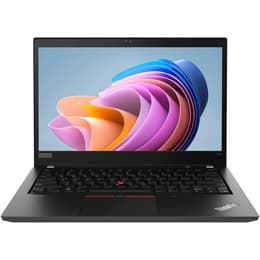
Lenovo ThinkPad T14 G1 14"
Starting at

Refurbished price:$302.70

Versus $569.99 new

See options
Microsoft Surface Laptop 4 13"
Starting at

Refurbished price:$399.00

Versus $1,049.00 new

See options

Differences at a glance

The Lenovo ThinkPad T14 Gen 1 (2020) and the Microsoft Surface Laptop 4 13-inch (2021) represent two distinct approaches to professional computing. While the ThinkPad focuses on modular utility, extensive physical connectivity, and a utilitarian legacy design, the Surface Laptop prioritizes a sleek aluminum chassis, high-resolution touch input, and a lightweight profile. These models run different versions of Windows, yet both handle standard productivity workloads effectively. Choosing between them depends on whether physical port versatility or modern aesthetic portability takes precedence for daily tasks.

Available Models

Storage (GB)

Processor

Memory (GB)

Scores

Durability

When examining longevity and hardware maintenance, both laptops offer robust construction standards tailored for multi-year professional or academic use, though they approach long-term serviceability differently.

  • Software Support and Updates: Both devices receive regular operating system updates and security patches through standard support channels, ensuring long-term compatibility with modern productivity software.
  • Repairability and Upgrades: The ThinkPad features modular internal components with accessible storage slots, whereas the Surface Laptop uses a more integrated design that restricts user-level component modifications.
  • Build Durability: The ThinkPad relies on reinforced composite materials designed to withstand travel wear, while the Surface Laptop utilizes a rigid aluminum body that handles daily transport reliably.

Release Year

2020

2020

Last Os Compatibility

Yes

Yes

OS

Windows 11

Windows 11

Performance

Performance capabilities vary depending on configuration, but both laptops manage day-to-day office applications, web browsing, and multi-document workflows with reliable efficiency.

  • Multitasking and Responsiveness: Both options handle heavy browser tabs and simultaneous productivity applications smoothly, aided by capable multi-core processing architectures and balanced memory configurations.
  • Battery Behavior: The Surface Laptop generally delivers longer away-from-the-outlet endurance during standard document editing, while the ThinkPad manages thermal loads effectively during sustained workloads.
  • Storage and Configuration: Both machines offer multiple solid-state storage capacities to accommodate large files, though the ThinkPad provides easier access for component replacement if storage needs expand later.

Graphic card

Integrated Graphics

Integrated Graphics

Screen quality

Display configurations on these two laptops cater to different visual preferences, balancing traditional widescreen workspaces against taller, content-focused aspect ratios.

  • Display Format and Resolution: The Surface Laptop features a higher-resolution touchscreen with a taller aspect ratio suited for viewing documents, whereas the ThinkPad offers a traditional matte screen option designed to minimize environmental glare.
  • Brightness and Outdoor Use: Both screens provide adequate luminance levels for indoor office environments and moderately lit rooms, though users working outdoors will notice similar reflections under direct sunlight.
  • Color and Clarity: Text rendering is crisp on both models, making them well-suited for extended reading, writing, and general media consumption without causing visual fatigue.

Resolution

1366 x 768

2256 x 1504

Screen type

IPS

IPS

Camera

Audiovisual

Multimedia capabilities, including integrated webcams, audio output, and microphone arrays, differ significantly in their hardware execution between these two devices.

  • Webcam and Video Calls: The Surface Laptop integrates a refined front-facing camera with clear low-light handling for virtual meetings, while the ThinkPad includes a standard definition sensor paired with a physical privacy shutter.
  • Audio and Speaker Output: The Surface Laptop projects rich, balanced sound through hidden speakers beneath the keyboard, whereas the ThinkPad utilizes downward-firing speakers that perform best on hard desk surfaces.
  • Microphone Clarity: Both machines incorporate dual-microphone arrays capable of isolating voice input from background room noise during remote communication sessions.

Miscellaneous

Physical design elements, port selections, and input peripherals highlight the fundamental philosophical differences between these two portable computers.

  • Port Selection: The ThinkPad provides an extensive array of traditional USB ports, HDMI, and a dedicated network jack, while the Surface Laptop relies on a minimalist port layout consisting primarily of single USB-C and USB-A connections alongside a proprietary charging interface.
  • Keyboard and Input: The ThinkPad features a tactile keyboard with deep key travel and a central tracking point, whereas the Surface Laptop offers a shallow, quiet keyboard paired with a spacious glass trackpad.
  • Dimensions and Weight: The Surface Laptop offers a lighter, thinner profile for effortless bag storage, while the ThinkPad maintains a slightly thicker, heavier chassis built to accommodate legacy connectors.

Weight

55 oz

64 oz

Screen size

14

13

What the community thinks

User feedback from online communities highlights distinct preference splits between these models. ThinkPad users frequently praise the dependable keyboard ergonomics, excellent tactile feedback, and the convenience of built-in physical ports that eliminate the need for external adapters. Conversely, Surface Laptop users often commend the sleek metal aesthetic, reliable battery longevity, and responsive touchscreen interface. Common criticisms for the ThinkPad involve its traditional boxy appearance, while Surface owners occasionally note the limitation of restricted port options and difficult internal repair access.

Users prioritizing comprehensive physical connectivity, keyboard comfort, and hardware serviceability will find the Lenovo ThinkPad T14 Gen 1 well-suited to their daily routines. Meanwhile, users prioritizing a lightweight footprint, high-resolution touch navigation, and clean modern styling may lean toward the Microsoft Surface Laptop 4. For those seeking sustainable choices, opting for a quality-assured refurbished option provides a practical way to acquire either device while minimizing environmental impact. Ultimately, the choice depends entirely on whether daily workflow demands extensive hardware expansion or streamlined portability.
Our recent comparisons