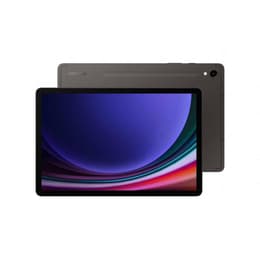

Galaxy Tab A9+ (11.0", 2023) vs Galaxy Tab S9 Ultra (14.6", 2023)

Galaxy Tab A9+ (11.0", 2023)
Starting at

Refurbished price:$144.95

Versus $495.00 new

See options
Galaxy Tab S9 Ultra (14.6", 2023)
Starting at

Refurbished price:$580.05

Versus $1,200.00 new

See options

Ratings

The Samsung Galaxy Tab A9 Plus and the Samsung Galaxy Tab S9 Ultra, both released in 2023, represent distinct approaches within Samsung's tablet offerings. While both operate on the Android platform with Samsung's One UI, they cater to different user needs through significant differences in display size, processing power, and overall feature sets. The Tab A9 Plus is designed for everyday tasks and media consumption, offering a balanced experience, whereas the Tab S9 Ultra is built for demanding professional use and immersive entertainment, pushing the boundaries of tablet capabilities.

Scores

Durability

When considering the long-term usability of these tablets, their release timelines and software support policies are key factors. Both devices launched in 2023, meaning they began their software support cycles at roughly the same time.

  • Software Longevity: The Galaxy Tab S9 Ultra, as a premium device, typically receives a longer period of major Android operating system updates and security patches, often extending to four years of OS updates and five years of security updates. The Galaxy Tab A9 Plus generally receives around three years of OS updates and four years of security updates, providing a slightly shorter but still substantial lifespan for general use. [16, 20, 37, 43]
  • Build Durability: The Tab S9 Ultra features an Armor Aluminum build and boasts an IP68 rating for water and dust resistance, offering enhanced protection against environmental elements. [5, 17, 20, 25, 30] The Tab A9 Plus has a metal body, which provides a sturdy feel, but it does not carry an official IP rating. [6, 10, 18, 20]
  • Expected Practical Lifespan: Users can expect both tablets to remain functional for several years. However, the Tab S9 Ultra's more robust build and extended software support suggest it may maintain optimal performance and security for a longer duration, particularly for users who push their devices to the limit.

Release Year

2023

2023

Compatible with latest Update

Yes

Yes

OS

Android

Android

Performance

The performance capabilities of the Galaxy Tab A9 Plus and Tab S9 Ultra differ significantly, impacting how smoothly they handle various tasks from casual browsing to intensive applications.

  • Processing Power: The Galaxy Tab S9 Ultra is equipped with a high-performance processor designed for demanding tasks, allowing it to handle complex applications, extensive multitasking, and graphic-intensive games with ease and responsiveness. [1, 12, 17] The Tab A9 Plus features a processor well-suited for everyday activities such as web browsing, streaming media, and light gaming, providing a smooth experience for general use. [18, 21]
  • Multitasking and Responsiveness: The Tab S9 Ultra offers substantial RAM configurations, contributing to its ability to manage numerous open applications simultaneously without noticeable slowdowns. [1, 3, 4, 15, 17, 36] The Tab A9 Plus, while capable of multitasking, may exhibit occasional micro-stutters or slower app loading times when switching between many applications, particularly with its lower RAM configurations. [9, 29]
  • Storage Options: Both tablets offer expandable storage via a microSD card, providing flexibility for users to store a large volume of files, photos, and videos. [17, 21, 38] The Tab S9 Ultra starts with higher internal storage options, catering to users with larger digital libraries or professional needs. [1, 3, 4, 8, 15, 36]
  • Battery Behavior: The Tab S9 Ultra, with its larger battery capacity, can provide extended usage, often lasting a full day or more of mixed use, even with its large, vibrant display. [1, 5, 12, 17, 28, 34] The Tab A9 Plus offers decent battery life for its class, typically providing 7-12 hours of screen time depending on usage, which is sufficient for most casual users. [9, 18, 22, 29, 32]

Memory (GB)

8 GB

12 GB

Processor

Qualcomm SM6375 Snapdragon 695 5G

Qualcomm SM8550-AC Snapdragon 8 Gen 2

Screen quality

The visual experience on these two tablets is a major distinguishing factor, primarily due to differences in display technology and size.

  • Display Technology and Clarity: The Galaxy Tab S9 Ultra features a 14.6-inch Dynamic AMOLED 2X display, known for its deep blacks, vibrant colors, and high contrast, providing an immersive viewing experience. Its resolution of 2960 x 1848 pixels ensures exceptional clarity and detail. [1, 4, 17, 20, 26, 28, 35] The Tab A9 Plus comes with an 11-inch TFT LCD screen with a resolution of 1920 x 1200 pixels, offering clear visuals suitable for general media consumption and web browsing. [2, 6, 10, 11, 19, 21, 32, 38]
  • Refresh Rate and Smoothness: The Tab S9 Ultra features a dynamic refresh rate of up to 120Hz, resulting in smoother scrolling and more fluid animations, which is particularly noticeable in fast-paced content and user interface interactions. [1, 4, 20, 26, 30] The Tab A9 Plus has a refresh rate of up to 90Hz, which provides a smoother experience than standard 60Hz displays, enhancing the fluidity of everyday interactions. [2, 6, 10, 11, 19, 21, 32]
  • Brightness and Outdoor Visibility: With a peak brightness of 930 nits, the Tab S9 Ultra offers strong outdoor visibility, though its reflective screen can still pose challenges in direct sunlight. [1, 26, 28] The Tab A9 Plus has adequate brightness for indoor use, but its LCD panel can appear washed out in direct sunlight. [10, 44]
  • Screen Size and Viewing Experience: The significantly larger 14.6-inch screen of the Tab S9 Ultra offers expansive screen real estate, ideal for productivity tasks, split-screen multitasking, and an immersive cinematic experience. [1, 4, 17, 20, 26, 30] The 11-inch display of the Tab A9 Plus provides a comfortable viewing area for portable entertainment and casual use. [2, 6, 10, 11, 19, 20, 21, 32, 38]

Resolution

1200 x 1920

1848 x 2960

Screen type

TFT LCD

Dynamic AMOLED 2X

Pixel density

210ppp

240ppp

Audiovisual

The camera systems on these tablets are designed for different purposes, with the Tab S9 Ultra offering more advanced capabilities compared to the Tab A9 Plus.

  • Rear Camera Performance: The Galaxy Tab S9 Ultra features a dual rear camera setup with a 13MP main lens and an 8MP ultrawide lens, capable of capturing detailed photos in good lighting conditions and recording 4K video. [1, 3, 4, 8, 17, 24, 26, 30, 39] The Tab A9 Plus has an 8MP rear camera with autofocus, suitable for scanning documents and casual photography in well-lit environments, but its performance diminishes in low light. [6, 10, 11, 32, 33, 38]
  • Front Camera Capabilities: The Tab S9 Ultra excels in front-facing cameras, featuring dual 12MP sensors (main and ultrawide) that are well-suited for high-quality video calls and selfies, even supporting 4K video recording from the front. [1, 3, 4, 8, 17, 24, 26, 30, 39] The Tab A9 Plus includes a 5MP front camera, which is decent for video calls and online meetings in good lighting, but not designed for high-resolution photography. [6, 10, 11, 32, 33, 38]
  • Video Recording Quality: Both tablets can record video, with the Tab S9 Ultra offering higher resolution and more stable video capture, including 4K from its main rear camera. [30] The Tab A9 Plus supports Full HD video recording at 30 frames per second. [6, 38]
  • Audio Experience: Both tablets feature quad speakers with Dolby Atmos support, providing an immersive audio experience for media consumption. [19, 44] The Tab S9 Ultra generally delivers a fuller audio profile with deeper bass, enhancing movies and gaming. [44]

Miscellaneous

Beyond core performance and display, several practical elements differentiate these two tablets, influencing their suitability for various users.

  • Connectivity Options: The Galaxy Tab S9 Ultra supports the latest Wi-Fi 6E and Bluetooth 5.3 standards, ensuring fast and reliable wireless connections. [4, 36, 44] The Tab A9 Plus supports Wi-Fi 5 and Bluetooth 5.1, which are sufficient for most everyday wireless needs. [11, 18, 19, 44] Both models offer optional 5G connectivity for mobile internet access. [11, 19, 44]
  • Port Types: Both tablets feature a USB-C port for charging and data transfer. The Tab S9 Ultra's USB-C port supports faster data transfer speeds (USB 3.2) and external display output, enhancing its productivity potential. [4]
  • Biometric Security: The Tab S9 Ultra includes an in-screen fingerprint sensor and face recognition for secure and convenient unlocking. [1, 3, 24] The Tab A9 Plus relies solely on face recognition for biometric security, lacking a fingerprint sensor. [10, 31]
  • Weight and Dimensions: The Tab S9 Ultra is a large device, measuring 326.4 x 208.6 x 5.5 mm and weighing 732g, making it substantial for portability but offering a vast screen. [3, 4, 5, 36] The Tab A9 Plus is more compact and lighter at 257.1 x 168.7 x 6.9 mm and 480g, making it easier to handle and carry. [11, 20, 38]
  • Stylus Support: The Tab S9 Ultra comes bundled with an S Pen stylus, which is IP68 rated and attaches magnetically for charging, enhancing its utility for creative work and note-taking. [1, 5, 17, 30] The Tab A9 Plus does not support the S Pen. [10, 32]

Weight

480 oz

15 oz

Screen size (inches)

11.0

14.6

Network

Wi-Fi + 5G

Wi-Fi

Carrier compatibility

Unlocked

Without SIM Port

Connector

USB Type-C

USB Type-C

User feedback for the Galaxy Tab A9 Plus often highlights its strong value proposition, with many praising its large screen and capable performance for media consumption and light productivity tasks. Users appreciate its solid build quality for its segment. Common criticisms include the absence of a fingerprint sensor, modest charging speeds, and basic camera performance, which are generally accepted given its positioning. Some users have noted occasional UI stutters when the refresh rate is set to 60Hz, recommending the 90Hz setting for a smoother experience. [9, 10, 18, 29, 31]

The Galaxy Tab S9 Ultra receives widespread acclaim for its expansive and vibrant AMOLED display, powerful performance that handles any task, and impressive battery life. The inclusion of the S Pen and its IP68 water and dust resistance are also frequently cited as major advantages. However, its considerable size can make it unwieldy for some, and the haptic feedback has been noted as less refined by a few users. [1, 5, 12, 17, 24, 28, 30, 34]

Users prioritizing a large, high-quality display and top-tier performance for demanding applications, creative work, or immersive entertainment will find the Galaxy Tab S9 Ultra well-suited to their needs. Its robust build and extended software support also make it a strong choice for long-term use. Conversely, users seeking a more portable and budget-conscious tablet for everyday tasks, casual media consumption, and web browsing will likely prefer the Galaxy Tab A9 Plus. It offers a balanced experience without the advanced features of its premium counterpart. Both devices, whether new or as a quality-assured refurbished option, provide a gateway to the Android tablet ecosystem, catering to different user profiles effectively.


See all articles

Our recent comparisons